-
English


Dust on a spherical LED display is easy to notice. Cleaning damage can be harder to spot. A dark area may disappear after wiping, yet leave a shiny patch that becomes visible under room lighting.
The goal is to remove dirt without changing the mask, protective glue, or surface coating. Before choosing a cleaner, identify the module construction and check the manufacturer’s maintenance instructions. A method suitable for one LED surface may damage another.
A spherical LED display does not necessarily have a smooth, sealed front. Its surface may include exposed LED packages, plastic masks, protective encapsulation, or several materials together.
Each part needs different care:
Ask the supplier to confirm the approved tool, cleaning agent, application method, and drying requirements for the exact module model. General LED maintenance guidance also emphasizes nonabrasive, noncorrosive materials and manufacturer advice when a cleaning procedure is uncertain.
Loose dust, fingerprints, and adhesive residue should not receive the same treatment.
Dry dust may need only an approved soft brush. Fingerprints may require a compatible cleaning agent. Tape residue, hardened deposits, or sticky patches need supplier advice before further work.
A sticky area is not always dirt. It could indicate a surface material problem. If the coating is lifting, the mask is loose, or an LED package appears damaged, stop cleaning that area and arrange an inspection.
Photograph these conditions before starting so existing damage is not confused with cleaning damage.
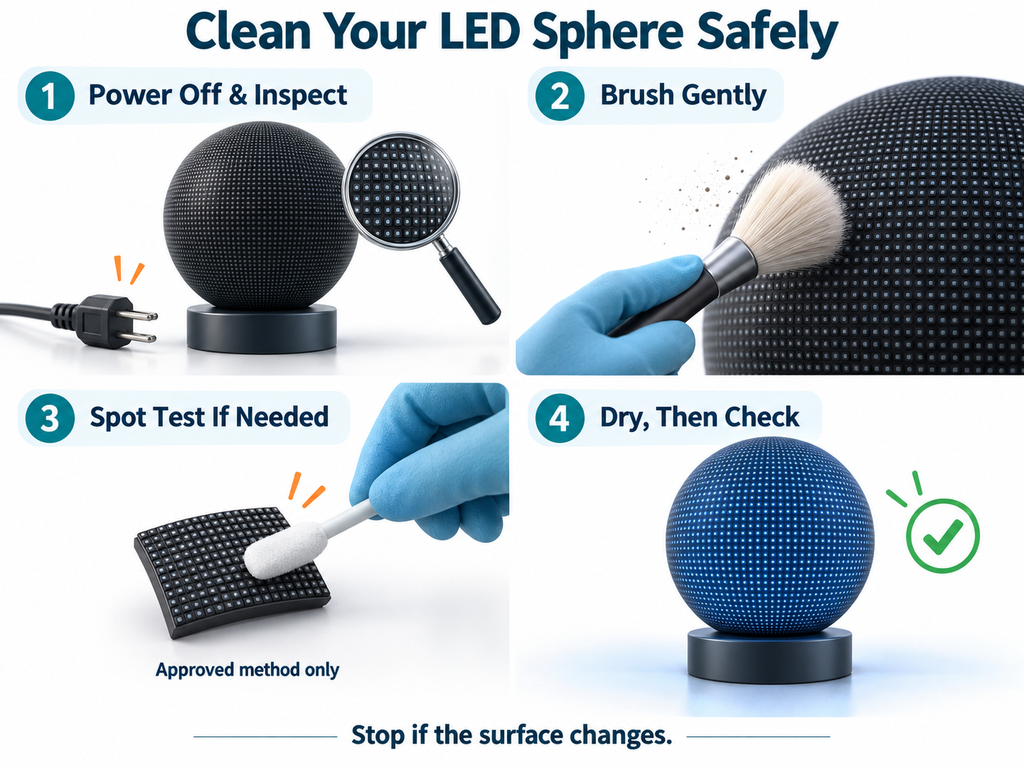
Shut down the display and isolate its electrical supply according to the maintenance procedure. A black image does not mean the equipment is disconnected. Let the screen cool before touching it.
For a suspended sphere, arrange a suitable work platform and keep people out of the area below. Do not pull the screen toward you or use its surface for support.
Prepare only the tools approved for the module. Keep them clean and separate from tools used on cabinets or floors, where grit and grease may collect.
Where the supplier permits brushing, use a clean, soft brush suitable for electronic assemblies. Work in small sections with light strokes.
Follow the local curve of the sphere. Move around the display instead of reaching across it and increasing pressure near the edges of your reach.
Avoid pushing bristles into module joints or dragging a cloth across exposed LEDs. If a tool catches, lift it away rather than pulling harder.
Do not assume compressed air or a household vacuum is suitable. Use either only when the manufacturer specifies an approved method and operating limits.
Wet cleaning should be used only when the manufacturer permits it for the complete surface assembly.
Do not treat alcohol, glass cleaner, disinfectant, or adhesive remover as universally safe. Even water should follow the approved procedure. An outdoor protection rating does not establish resistance to cleaning chemicals.
Before treating a visible area, test the approved method on a matching spare module where possible. Otherwise, ask the supplier to identify a suitable test location.
Use this simple comparison:
Look for whitening, streaks, changed gloss, swelling, or lifted edges. Stop if material transfers onto the cleaning tool. A successful spot test helps detect immediate problems; it does not replace manufacturer approval or prove long-term compatibility.
Once the method is confirmed, divide the sphere into manageable sections. Record completed areas on a photograph or drawing rather than sticking labels onto the display surface.
Where an approved liquid method is used, prevent runoff from reaching joints or collecting underneath the sphere. Never increase liquid quantity simply because a stain remains.
For example, on a lobby sphere, fingerprints around visitor height may need local treatment while the upper surface needs only dust removal. Cleaning should match the contamination in each area.
Check the surface under room lighting first. Look for fibers, residue, altered reflections, and displaced masks.
Restore power only after the manufacturer’s drying requirements are met. Then display uniform white, gray, red, green, and blue images. Compare any suspicious area with the photographs taken before cleaning.
Record the method, products used, affected sections, and any changes. This gives the next maintenance visit a useful reference.
Only if the module supplier approves it. Cloth can snag on exposed LEDs or raised mask edges.
Inspect regularly and clean according to actual dust and contamination levels, following the supplier’s schedule.
Stop repeated rubbing. Ask the supplier whether it is dirt, residue, or surface damage.
TOOSEN supplies LED display solutions and after-sales support. When discussing a spherical LED display, request cleaning instructions for the proposed module construction. Share the installation height, environment, and expected contamination so maintenance access can be considered before installation.
+86 18688923792
+86-755-23312336
4th Floor, Building B, Zhonghe Building, Taiwan Industrial Zone, 2132 Songbai Road, Shiyan Street, Bao'an District, Shenzhen.


Emall us with any questions or inquiries or use our contact data.We would be happy to answer your questions.
Toosen Professional Manufacturer of led sphere display,led screen globe,led ball display,spheric led screen,spherical led display, Led Special-shaped LED manufacturer, LED factory,Manufacturers & Suppliers,Factory & Exporters. Looking forward to your cooperation.
Copyright © 2010-2026 Toosen LED All Rights Reserved
Theme by WordPress