-
English


Many people assume the job is done once an LED screen lights up and displays content. In reality, that’s only the beginning. Without a proper inspection process, issues such as module misalignment, uneven surfaces, flickering, blackouts, or even incorrect components can go unnoticed—and become costly problems later.
That’s why a structured acceptance checklist is essential.
At Toosen, a professional LED display manufacturer, we deliver more than just hardware. Whether you choose our transparent LED solutions, creative custom-shaped displays, or traditional LED screens, we focus on long-term performance and reliable after-sales support. With years of industry experience, we understand that strict quality control directly determines how well your LED screen performs over time.
Below is a practical LED display inspection checklist to help you maximize lifespan and ensure optimal performance.
Surface flatness directly affects both visual quality and structural integrity.
An uneven LED surface can lead to:
LED displays consist of thousands of modules and millions of pixels. Even minor misalignment can distort the image.
This step is especially important for:
Accurate factory calibration and tight module tolerances are key to achieving seamless image performance.
Many LED screens claim “high refresh rates” and “HD quality,” but you should verify these claims.
A true high-refresh-rate LED display will appear stable and clear in photos.
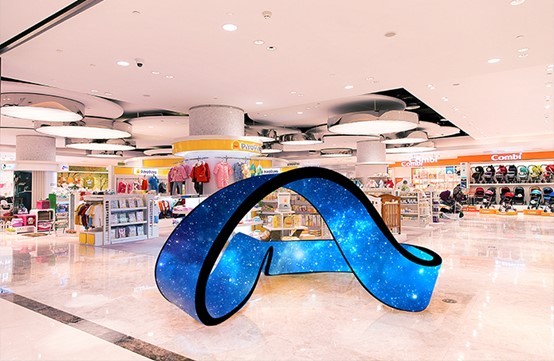
Size discrepancies can significantly impact both cost and expected performance.
Always measure the active display area—not just the cabinet frame size.
Even small deviations in area can lead to major cost differences.
Finally, and most importantly, confirm that all internal components match the agreed specifications.
Core components are the “heart” of your LED display system. Substituting them with mismatched or lower-grade alternatives will reduce performance, shorten lifespan, and may even void your warranty.
Powering on an LED screen doesn’t guarantee quality. A thorough inspection ensures that your investment delivers the performance, reliability, and visual impact you expect.
By following this checklist, you not only prevent hidden issues but also extend the lifespan of your LED display—making it a smarter, more sustainable long-term solution.
+86 18688923792
+86-755-23312336
4th Floor, Building B, Zhonghe Building, Taiwan Industrial Zone, 2132 Songbai Road, Shiyan Street, Bao'an District, Shenzhen.


Emall us with any questions or inquiries or use our contact data.We would be happy to answer your questions.
Copyright © 2010-2026 Toosen LED All Rights Reserved
Theme by WordPress